Showing posts with label Diary. Show all posts

Android L - Is it going to be Lollipop or Ladoo?..


   Android L - The new big thing in android world.Google recently announced its upcoming version of the ever growing awesome android OS in the Google I/O 2014.And it codenamed it as android l -Wonder what L will be called when it is released.ha..we indians are fond of our sweet Ladoos hehe...so we vote for ladoo.Jokes apart it will most probably be Lollipop.

          Google also released a Developer Preview of the Os for its flagship devices that are the NEXUS 5 and the NEXUS 7.In the developers preview we see a number of UI changes and new feature additions.And as it is not the final release there is going to be much more to come to it later.This developers preview just was for the devs to have an idea about the new design philosophy of google that is "Material Design:".

          Now what is Material Design?.Its basically a kind of flatter and cleaner look to the android OS way better and simpler than the Holo look of the ICS till KK.And most amazing thing about it is that you wont be bored to use it since every new window opens with a new animation .It slides out from some side.

          Now let us have a look to the UI changes seen in the Android L dev preview.

1)Google Now Launcher:

   As you see the the app drawer icon in the google now launcher has been changed to look somewhat shinier and flater.Also the wallpaper ,widget and settings icons have changed .

2)Navigation Bar:


        A you see the navigation bar has become completely transparent as compared to the KitKats shadowy nav bar.Also the three navigation buttons are also changed to triangle,circle and square for the back,home and recent apps respectively.

3)The Notification Panel:

           The notification panel has seen the most drastic change in its look and feel. The color of the notifications was black and also it rested on a translucent panel.Now we have white colored notifications resting on transparent panel.You can do the regular operations like touch to open and swipe left or right to dismiss them.New thing added is that when you pull the notification further you get to see the quick toggles and a brightness control bar.


4)Heads Up Notifications:

        This new feature is going to let you do your work and simultaneously reply to an SMS or a whatsapp message or any other IM.Futher more all other notifications will pop down from the top of your screen and show in front of you as shown in the screenshot.


5)Settings UI:

        As everything in android L has become somewhat flatter ,even the settings app will be revamped a lot.Now you see everything in plain white and you get end of page feedback in the shadow animation and the top and bottom of the settings page.This I thought looks more like HTC sense Settings at first look but there are new things in it.Also there is addition of new settings .

6)Lockscreen:

      The new lockscreen is quite different.Earlier you had to hold the bubble and move it to any direction to unlock your device,but now unlocking is just swiping up the lock icon.There is shortcut to dialer to the left and the camera as earlier to the right.

7)Dialer and Contacts App:


8)Recent Apps:

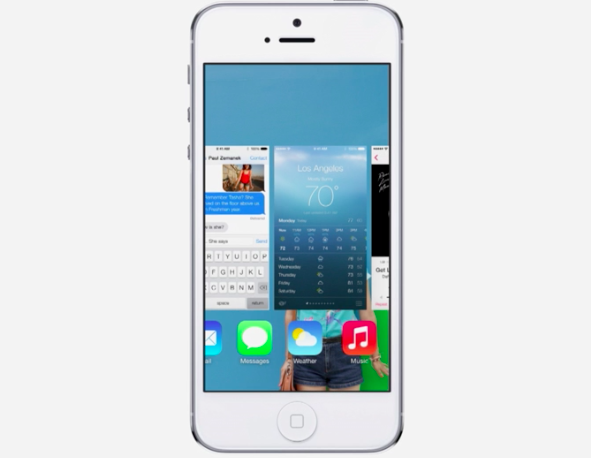
      Recent apps are going to be shown as the google chrome tabs.And new thing is that each instance of the app is going to be shown in the recent apps section.For eg.When you open an app suppose Settings >Display,You will see both the settings main page and the display settings page in the recent apps . Also every single of your google chrome tabs will be seen on the recent apps list.
 If you have seen the IOS 7 Recent apps feature you would say android l has copied it from them.


9)Google Keyboard:

  Google keyboard app also changed its skin.It is now more flat and minimal looking.color has changed and it suits the material design philosophy.


    Along with the above mentioned things lot more things are going to change as final Android L will be released.

ENJOYED READING ?WANT TO HAVE ANDROID L UI ON YOUR DEVICE?


iOS 7-REVAMPED iPhone.


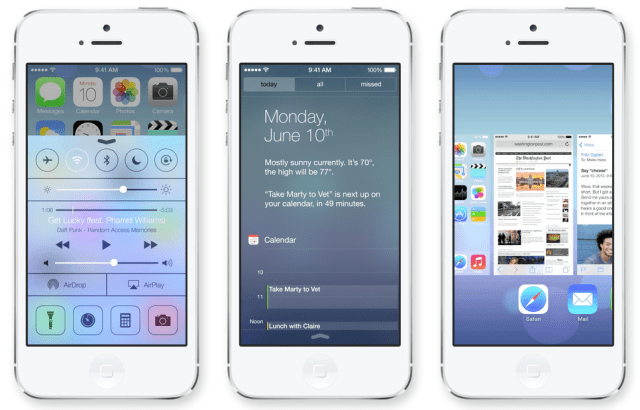
     Today Apple announced its new generation phone OS the iOS 7.It is the 7th successor of the previous OS'ss and is the most different of them all.If you take a look at all the 7 iOS's side by side this version stands out differently.It has completely redesigned the old look of the idevices.

Although i think that apple has tried to copy features from Android and BB.Rather they not only copied the features but gave them a more stunning look.

iOS 7 has brought about significant changes in the design of each and every famous feature of the previous iOS's.They have tried to make it more and more user friendly.

The older features like the keyboard,the font,the homescreen wallpapers, the messaging apps,The safari browser and all the old cool stuff is now even cooler.

KEYBOARD:
The older keyboard was a dark grey background with big light grey buttons and bold letters and now it has a creamy white background and pure white keys with non bold letters.


THE SAFARI BROWSER:
Safari unlike before opens in a full screen mode which gives a wide view of the websites you visit.The new feature i liked in the new safari is the TABS.This time the tabs appear as vertical carousal which you can slide up or down and select the tabs.You can now have any number of tabs open at a time unlike earlier in which you could open just 8.

CAMERA:
The camera has also been revamped this time.You can change modes just by sliding your finger left or right.Real time FX and many more cool features are introduced.It categorizes the pictures you take according to place occasion and time taken automatically.

SIRI:
The new SIRI has become smarter than before.Now it can speak with you in different voices including new male voices.It can also be told to toggle setting like Bluetooth and Wifi or brightness.It has a new interface too.It is now integrated with twitter and wikipedia,.


LOCKSCREEN:
The old  'Slide to unlock' lockscreen has now changed.It also comes with a drop down notification center that is much similar to the androids drop down status bar.

NEW FEATURES:


CONTROL CENTER:
This works as the name says, it controls all the basic things of you idevice like adjusting brightness toggle Bluetooth,Wifi,Rotation and airplane mode.It appears on the screen by pulling it up from the bottom of the device.It also has a quick music player and shortcut to apps like clock,calculator,camera and also flashlight.
The airdrop (covered later in the post) can also be toggled here.


MULTITASKING TRAY:
This is a feature that all android 4 guys are familiar with.It is same as the multitasking tray in android.You can access it by double tapping your homescreen .It has become easy to jump between apps and kill them when not in use just by pushing them up.


AIRDROP:
You can share files with your friends just by tapping on their faces.Also sharing is possible with unknown contacts by toggling the 'EVERYONE' option.Airdrop uses your wifi ad-hoc network. 
iTUNES RADIO:
This was the much awaited feature of the iOS7.You can now listen to thousands of songs and buy them from iTunes.You can create you own radio channel.You can browse as many stations and select the appropriate song you want.


 DO YOU THINK IOS 7 HAS COPIED A LOT FROM ANDROID? SHARE YOUR VIEWS IN THE COMMENTS SECTION.


Firefox OS-New Smartphone OS in field.


  Another new smartphone OS has been released by the Mozilla.Yeah the same company which has developed a Web Browser.Actually the Os also has its name same as the browser and is called "Firefox OS" a.k.a B2G(Boot to Gecko).

This Os is supposedly going to run on both mobile phones and tablets computers.It is like Android a Linux based open source OS.This OS's has its coding on simply yet powerful coding languages HTML 5,CSS,JAVA SCRIPT and C++.This makes its development easy to learn.

Mozilla demonstrated its working on a Android running device.At present their are no FOS devices in the Market although ZTE,LG,TCL and other such companies are looking forward to release a FOS based device.

As there is no device launched yet Mozilla released a FOS emmulator to attract a lot of mobile geeks and devs.

DETAILED OVERVIEW OF THE FIREFOX OS


1)THE HOMESCREEN.

This is the Homescreen of the OS.It is simply and serene looking.It has  stagnant clock and Day and Time resting on this screen.
 Like any other OS it has its Dock at the bottom of the screen with 4 icons namely Dialer,Messaging,Contacts and Browser.

Unlike android they are non movable and irreplaceable.

It has 3 more pages among which two are for apps and one his a handy search page which lets you search the content in your phone as well as on the Marketplace and the whole world wide web.


2)STATUS BAR
This feature is taken from the Android OS.It is a standard Android like Pull down status bar.It features the toggles and a shorcut to settings and the notifications.

This toggles are at rest too.They cannot be changed or replaced.


3)APPLICATIONS:
a)Dialer:
Simple and clean Dial pad with bold numbers.A shortcut to add new contact beside the green call button.
The 3 more options at the bottom viz.Call logs,Contacts and dialer itself.


b)Messaging app
Nothing extraordinary!Messaging app similar to any android Messaging app.Key board is sophisticated though.


c)Browser
Fast and easy navigation.A slider on the side for tabs.That's a good idea because when you keep tabs option near the close option it sometimes is mistouched.


d)Gallery
Gallery looks a lot like the Android Jelly Bean gallery.The new feature in this is a on spot editing of images.To zoom the pic you have to double tap it.I couldn't check if it has Pinch to zoom feature for OBVIOUS REASONS.Editing options are for simple editing like exposure settings,few effects and crop picture and all that.


e)The MarketPlace.

Clean Ui.The Most popular and new apps are at a touch's distance.


4)TASK MANAGER

The android 4+'s feature the Task Manager is also present in the FOS.


LWP's of Famous Flagship Devices.


                In this post 've covered some of the amazing Live wallpapers available on the play store.These LWP's are of the  most famous flagship devices of many renowned companies like samsung,htc,sony etc...

The flagship devices of :

SAMSUNG 

Samsung Galaxy S3


Samsung Note 2


Samsung Galaxy S4


HTC 


Htc Droid DNA


SONY

Xperia Z


GOOGLE


Nexus


Android OS's LWP's :


GOOGLE LAUNCHES SPECIAL SECTION FOR BOOKS.


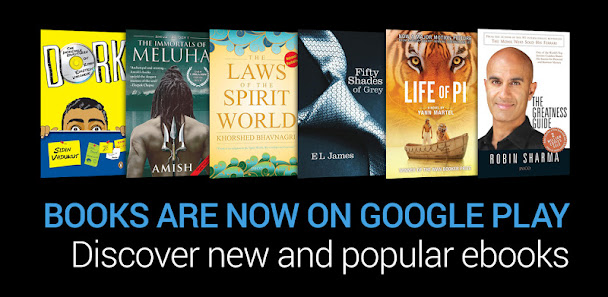
Google launches a new section in their Google Play store."BOOKS". Foe people who love reading books can now have pleasure of reading on their 'Shiny Glass Pieces'-Android phones ,tablets,kindles or ebook Readers or Google Chrome Web App .They have also allowed another option for reading those books on your lappys and Pc's using a Web browser.Android users must download the GOOGLE PLAY BOOKS app available for free to access these books.

      I was surprised to see that Google has made a provision for the Apple users to enjoy their BOOKS...

Google claims to have listed over 4 million books to choose from in every imaginable category, including many free ebooks.


Categories


The books section has almost the same Layout as the App store.It shows most trending and top paid and top free apps to the left.With several categories and sub-categories.


      Books are going to be either in flowing text format or Scanned pages.
I have had the worst experience in reading scanned pdf files on my android.It sucks!!After all you cannot adjust the text according to your wish.You have to continuously go on scrolling in all possible directions whereas in the flowing text you just have to adjust the zoom to get optimal font size for your eyes and start reading .You have to scroll only downwards..Its far Better.

                 The free books can be read in the Browser itself.How?
You just go to the book you wish to read and then select the How to read Tab.You can see an option Read On your Browser.Just click on it to open your book then and their and start reading.

PLAY ANDROID APPS ON WINDOWS TABLETS.


The Bluestacts app player team has developed an app player for Windows 8 running PC's and  Tablets.Finally the boundary between the windows and the Android platform no more exist.


"Use all 750,000 Mobile Apps on PC or Mac"

This is seen on Bluestacts official Website.

"Finally! Now You Can Get Thousands of the Best Android Apps on PC." - Business Insider
The complete Touch And Play experience of the Android Tablets Can now be enjoyed on Windows Tablets.So don't Think before Buying the SURFACE TAB.Over 5 Million downloads were recorded according to the Bluestacs Team.

The company has an excellent revenue plan.They are asking DeVS to promote their apps on Bluestacs.They just have to DO the following:


DOWNLOAD THE WINDOWS 8 PC AND TABLET VERSION HERE.


Jolla Sailfish-Competition to Android

   
      New OS launched by Jolla(Yola) at SLUSH 2012 in Helsinki,Finland.It is a open source OS just Like Android is.It means there could be thousands of apps and games developed by numerous developers all over the world.Jolla said that mobile phone manufacturers (e.g. NokiaSamsung etc.) will be able to license and use Sailfish on a phone, just like Android.

News is that some of the Android applications could be used on the Sailfish running devices.Along with Mobile phones Sailfish could is expected to be seen on Tablets,TV's and automotive services.
Jolla held an official launch event for its new mobile OS yesterday at SLUSH 2012 in Helsinki, Finland. The new Jolla Sailfish mobile OS is the successor to the popular MeeGo. The particular strengths of Jolla Sailfish are said to be multi-tasking, app and notification peeking, its open source nature and adaptability for smartphones, smart TVS, tablets and automotive uses. A clever advantage this new mobile OS has is that many Android apps are compatible without modification, say the developers.


   I believe that Sailfish could be a competition to ANDROID and other smartphone Os's (iOS,symbian) .It has got  amazing UI and  and the LINUX based kernel as in Android allows it to replicate the android functionality and productivity.Sailfish has got a minimalistic design and features like multitasking and Notification peeking.

It has i think copied some key features of the other mobile OS's like it has the Windows phone like tiles and  and also Blackberry 10 feature peeking.

I Think it would give a fair competition to android and other Mobile Os's.What do you guys think ?
Comment and let me know your views,Let me know if i've missed something.


TOP HOMESCREEN LAUNCHERS


These are some top rated and most downloaded Home screen replacement applications available on android.

Try Them and tell us your views in the comment section.


©Ambarish Pande

.
 
APK REVIEW FOR YOU. © 2012 | Designed by Rocking Templates , helped by Chica Blogger
UA-34497069-1